
Download SWF Catcher – Flash Animation Extractor, SWF Extractor, Browser Extension, Internet Explorer, Firefox, Game Capture Tool
Overview
SWF Catcher is a utility tool designed to simplify the extraction of Flash animations and games from websites. It functions as a browser extension compatible with both Internet Explorer and Firefox, enabling users to access and save Flash content that is typically stored in temporary browser files. The app addresses the challenge of retrieving Flash-based media, which often remains hidden and inaccessible after a webpage is loaded. This makes it particularly useful for users who wish to preserve or reuse Flash animations, such as vintage games, interactive banners, or embedded multimedia elements.
Target users include web developers, digital archivists, educators, and enthusiasts interested in Flash-based content. The tool is especially valuable in preserving digital artifacts from the early internet era, where Flash was a dominant medium for interactive experiences. Although the developer did not provide additional technical details about the project’s origins or development team, SWF Catcher has established itself as a reliable utility within the niche category of browser-based content extractors. Its purpose is not to replace Flash players but to facilitate the retrieval and local storage of SWF files for later use.
SWF Catcher fills a critical gap in the current digital ecosystem by offering a straightforward solution for content recovery. With the decline of Flash support across modern platforms, tools like this become increasingly important for maintaining access to legacy media. The app’s minimal footprint and free pricing model further enhance its accessibility, making it a practical choice for users seeking a no-frills extraction method.
Key Features & Functionality
- Seamless Browser Integration: SWF Catcher integrates directly into the toolbars of Internet Explorer and Firefox, allowing users to initiate extraction with a single click. This integration ensures quick access without requiring complex workflows or additional software.
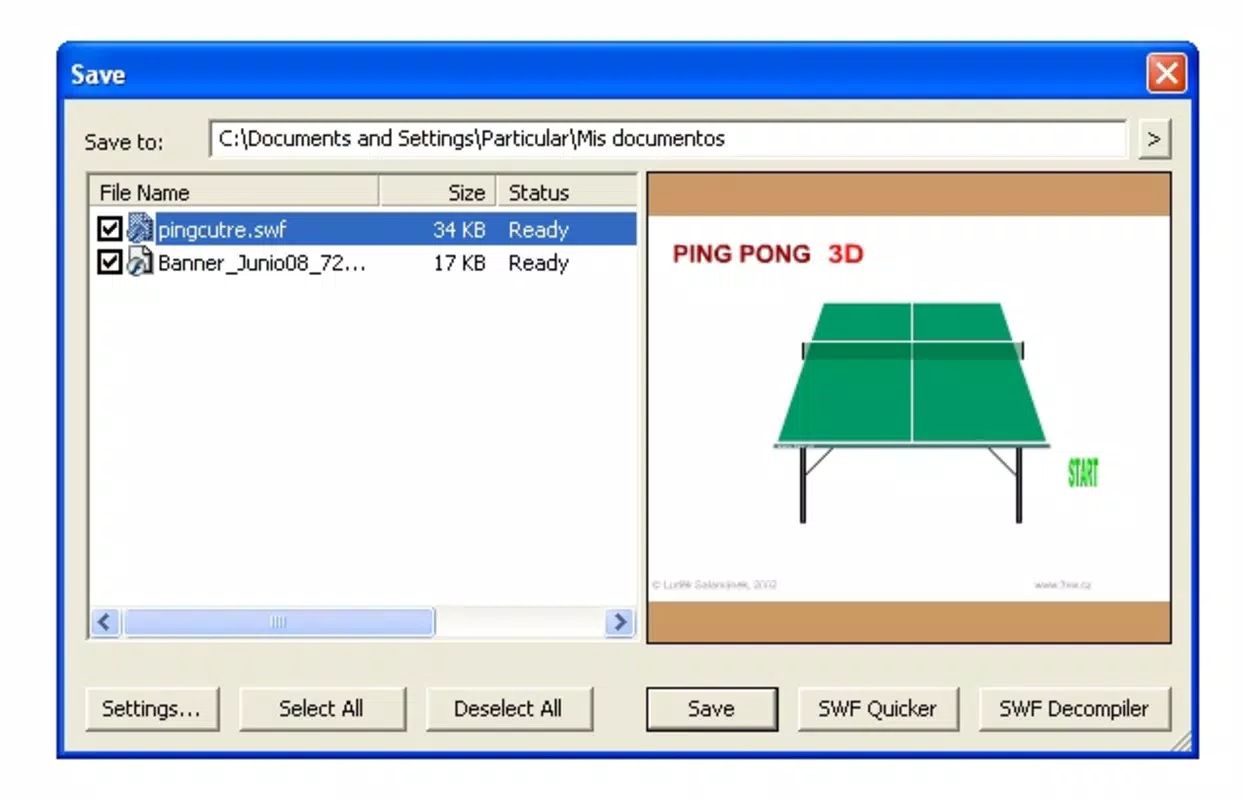
- Visual Animation Preview: In Firefox, the extension displays a sidebar listing all detectable animations, complete with visual highlighting to indicate the active element. Internet Explorer users benefit from a dedicated preview window, enabling them to confirm selections before saving.
- User-Friendly Interface: The interface is designed with simplicity in mind, featuring clear navigation and logical layout options. Even users with minimal technical experience can operate the tool effectively within minutes.
- Efficient Content Extraction: The core functionality allows rapid capture of Flash animations and games stored in browser cache. This eliminates the need for manual file searches or third-party tools, streamlining the retrieval process significantly.
- Multi-Platform Support: The tool is tailored for two major browsers, ensuring consistent behavior across different environments while maintaining compatibility with the respective browser architectures.
For example, a user browsing a Flash-heavy educational website can use SWF Catcher to extract an interactive animation used in a lesson. Similarly, a game collector can save vintage Flash games from defunct websites before they become inaccessible. These real-world applications demonstrate the tool’s practical value in preserving digital content.
Interface, UX & Performance
The user interface of SWF Catcher is clean and minimal, focusing on functionality over visual embellishment. The toolbar icons are clearly labeled, and the integration with each browser maintains a consistent look and feel. Navigation is intuitive, with direct access to the extraction function and preview options. Users can initiate the scan process with a single click, and the results are displayed promptly.
Although the developer did not list formal performance metrics, the app’s lightweight nature—only 3.5 MB in size—suggests efficient resource usage. It does not appear to significantly impact browser speed or memory consumption during operation. The responsiveness of the preview features is adequate for typical use cases, with minimal lag when listing or displaying animations.
Stability appears to be well-maintained, given the app’s release history and continued availability. The tool functions reliably across different versions of Internet Explorer and Firefox, though specific compatibility details were not disclosed. Overall, the UX is optimized for speed and clarity, aligning with the expectations of utility-focused applications.
Platform Compatibility & Technical Requirements
SWF Catcher is designed exclusively for the Windows operating system. It is compatible with both Internet Explorer and Firefox, two browsers that historically supported Flash content. The app has a file size of 3.5 MB, which indicates a lightweight installation and minimal storage impact.
The software version is 2.0.1, released on December 18, 2020. Specific requirements for the minimum OS version or browser versions were not listed by the developer. This lack of detail means users should exercise caution when installing on older or updated systems, particularly if Flash support has been discontinued in newer browser builds.
Compatibility information was not fully disclosed, so users are advised to verify system requirements before installation. The app does not appear to be available on mobile platforms or other operating systems, limiting its scope to desktop Windows environments.
Pros and Cons
Pros
- Free to download and use, making it accessible to all users.
- Lightweight design with a small file size of 3.5 MB.
- Direct integration with Internet Explorer and Firefox.
- Provides visual previews for easier content selection.
- Simple interface suitable for beginners and non-technical users.
Cons
- Only supports Windows, limiting cross-platform access.
- Not compatible with modern browsers that no longer support Flash.
- Developer did not provide detailed system requirements.
- App is not available on mobile devices or other operating systems.
- Release date is from 2020, suggesting limited recent updates.
FAQ
Is SWF Catcher safe to install?
Yes, the app is free and available from official sources. However, users should ensure they download it from trusted websites to avoid bundled software or malware.
Can I use SWF Catcher on modern browsers?
SWF Catcher was designed for Internet Explorer and Firefox, but these browsers no longer support Flash. As a result, the tool may not function properly on updated versions of these browsers.
Does SWF Catcher work on macOS or Linux?
No, the app is only available for Windows. There is no version for macOS or Linux systems.
Is SWF Catcher regularly updated?
The last release was in 2020. While the app remains functional, it has not received recent updates, which may affect compatibility with newer systems.
Can I extract Flash games using SWF Catcher?
Yes, the tool is specifically designed to extract Flash animations and games from websites, making it ideal for capturing legacy games stored in browser cache.
Final Thoughts
SWF Catcher remains a practical solution for users seeking to extract Flash content from websites, particularly those working with archived or educational material. Its straightforward interface, browser integration, and free pricing make it a compelling choice within its niche. While it is limited to Windows and older browsers, it continues to serve its purpose effectively for those who still rely on Flash-based content.
For digital archivists, educators, and Flash enthusiasts, this tool offers a reliable method to preserve legacy media. Despite its age and lack of recent updates, SWF Catcher delivers on its core promise: efficient, no-frills extraction of SWF files.
Download SWF Catcher now


